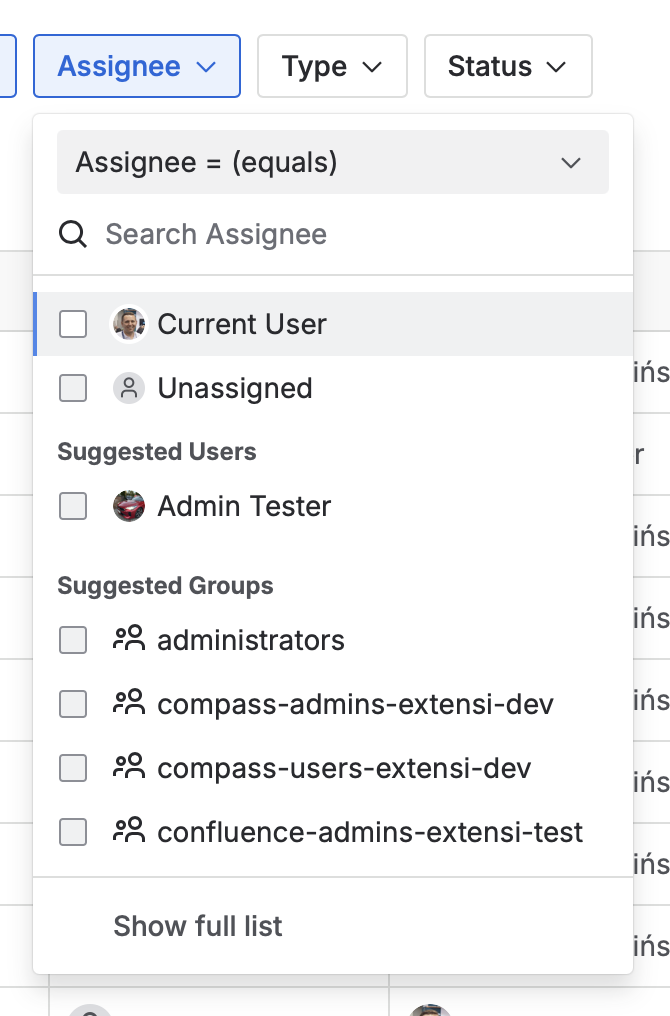
Following the recommendation from Atlassian Ecosystem Support, I’m redirecting this bug report to the Developer Community to get input from other developers and experts who might have encountered the same issue.
When using the UserPicker component (@atlaskit/user-picker) inside a DropdownMenu (@atlaskit/dropdown-menu) with menuPosition="fixed", changing the position of the parent container within the application layout causes the UserPicker’s dropdown content to be misaligned with the input field.
This misalignment can be triggered by:
Adjusting padding or margin
Moving the container within the page structure
Wrapping it with additional layout elements
Steps to reproduce:
Place UserPicker inside a DropdownMenu, within a DropdownItemGroup.
Set menuPosition="fixed" on UserPicker.
Set shouldRenderToParent on DropdownMenu to true.
Move the parent container within the page or adjust its offset (e.g., add padding, margin, or wrap in another element).
Open the UserPicker dropdown inside dropdownMenu component.
Expected behavior:
The dropdown should remain correctly aligned with the input field regardless of the container’s position in the application.
Actual behavior:
The dropdown content shifts and becomes misaligned with the input field whenever the parent container’s position changes.
When I inspect the css it looks like top and left attributes are being set against the dropdown. I had some luck fixing the misaligned dropdown by unsetting these attributes by passing in a StylesConfig object to the styles prop.
<UserPicker
  styles={{
    menu: (provided) => ({
      ...provided,
      left: "unset",
      top: "unset",
    }),
    menuPortal: (provided) => ({
      ...provided,
      left: "unset",
      top: "unset",
    }),
  }}
  fieldId="example"
  appearance="compact"
  isMulti
  // This issue occurs only when menuPosition="fixed"
  menuPosition="fixed"
  open
/>
This seems to fix the misaligned dropdown but I’m still seeing some weird misalignment inside the select input field itself which I was able to reproduce by adding some users and then removing them.
If you can, maybe try updating to newer versions of the packages (especially since @atlaskit/user-picker is a few versions behind) and see if it still remains.
Hey all Thanks for raising this and sharing a repro.
Definitely acknowledging this is a problem, however, using a user-picker within a dropdown-menu appears not be the best combination from an Accessibility/UX perspective. Perhaps it’s worth exploring different designs regardless?
Also, could you share some background behind why you need to use menuPosition=”fixed” in this situation is there a problem with the default positioning approach?
Since Przemek has already described the business context, I’d like to add a bit about the technical side. We’re using position: fixed to allow the user picker dropdown to render outside of the parent dropdown menu. This ensures the picker displays correctly in cases where standard positioning would otherwise restrict visibility or cause clipping.
However, using position: absolute in this case results in the dropdown being rendered inside the parent without expanding it, which means the user would not be able to see it.

 Thanks for raising this and sharing a repro.