Hi everyone,
I just created a Confluence macro (Custum UI) with the template “confluence-macro-with-configuration”.
node_modules are already created during the forge create process.
I didn’t change any code!
After forge deploy and forge install I added the macro to a page.
- The “config” appears as a modal in a white page!
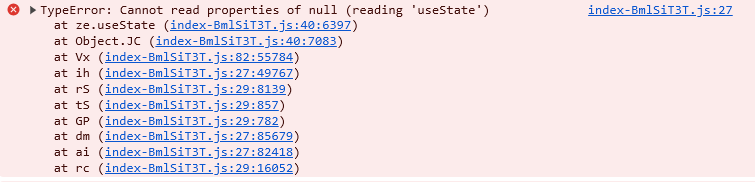
- The browser console shows the error:
TypeError: Cannot read properties of null (reading ‘useState’ )
It seems, that React isn’t loaded correctly.
Is the Vite configuration the culprit? Other ideas?
Additional questions:
- Is Vite supported by the Forge team?
- Is there any documentation how to configure Vite with Forge?
BR,
Franz
manifest.yml.txt (648 Bytes)
package.json.txt (742 Bytes)
vite.config.js (110 Bytes)
Vite does work with Forge, but getting it set up reliably isn’t exactly straightforward. Especially if you haven’t spent much time working with JS build tools inside a platform like this. A few things to keep in mind:
- The error you’re seeing just means the React packages are missing. You need to install them manually. Check the
README.md for the right subdirectory to cd into, usually something under static/, and then run npm install.
The default packages are outdated. Run the following to clean up broken or deprecated dependencies:
npm audit fix
npm audit fix --force
- You’ll want to define a
dev script in each package.json inside the static/* directories so you can run npm run dev and have Vite start with the right config. Make sure your Vite config points to the correct entry and asset paths based on the Forge structure.
- When you use
forge create, it sets up the top-level layout, but each static app is its own standalone React + Vite project. Treat it the same as you would any other Vite project.
- Don’t forget to run
npm run build before deploying. This is also covered in the README.md.
- If you’re running into tunneling issues or hot reload doesn’t sync properly, I posted a reply earlier today that shows how to run Vite with tunneling inside Forge. Check my other posts for that example.
@AlexCevicelow thanks for the fast reply!
Are you referring to the README.md that is delivered during the forge create task?
I’m a little bit confused  - I am new to Vite.
In my impression the generated structure is quasi-standard for VIte projects within Forge:
/
¦   manifest.yml
¦   package-lock.json
¦   package.json
¦
+---node_modules
¦     ...
+---src
¦       index.js
+---static
    +---config
    ¦   ¦   index.html
    ¦   ¦   vite.config.js
    ¦   +---build
    ¦   +---src
    ¦           Config.jsx
    ¦           index.jsx
    +---hello-world
        ¦   index.html
        ¦   vite.config.js
        +---build
        +---src
                App.jsx
                index.jsx
So - do I need to npm install in each static subfolders config & hello-world?
Can one show me a working example (Github / Bitbucket)?
Thanks,
Franz
@ Atlassian Forge team:
Can you pls. answer the questions (support & documentation)
For official templates created with forge create, I’d expect them to work without further intervention.
BR,
Franz
In the meantime I could resolve this issue by adding “@vitejs/plugin-react” to the dev-Dependencies.
Also I changed vite.config.js:
import { defineConfig } from 'vite'
import react from '@vitejs/plugin-react'

// https://vitejs.dev/config/
export default defineConfig({
  base: './',
  plugins: [react()],
  build: {
    outDir: 'build'
  }
})
This worked